With the advent of model management in Dynamics AX 2012, Microsoft has gotten rid of the ax.aod files which in previous versions of DAX constituted the layers.
In DAX 2012 adjustments for the meta data model and code are stored in the modelstore in the database.
In previous version deleting a layer containing adjustments to the standard application consisted of delete the ax.aod file and synchronizing and compiling.
How is this done in DAX 2012 ?
The answer is a command-line tool called AxUtil.
To delete e.g. the usr-layer in the application do the following:
1) Shut down all AOS-servers but one (applicable only if you have more than one AOS running).
2) Go to command line interface on the server where the last AOS is running.
3) Go to the folder where DAX's management utilities are placed, e.g.
C:\Program Files\Microsoft Dynamics AX\60\ManagementUtilities
4) Run the Axutil like this:
Axutil delete /layer: /db:
To delete the usr-layer in the MicrosoftDynamicsAx database:
Axutil delete /layer:usr /db:MicrosoftDynamicsAx
Below an example is shown:
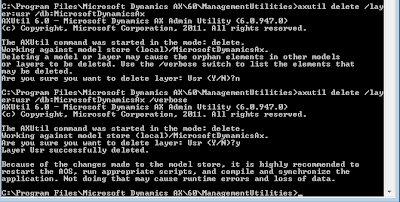
5) Restart the AOS
6) Start the DAX client.
7) In the process of starting up, DAX will detect that something has happened with the modelstore, and prompt you with:
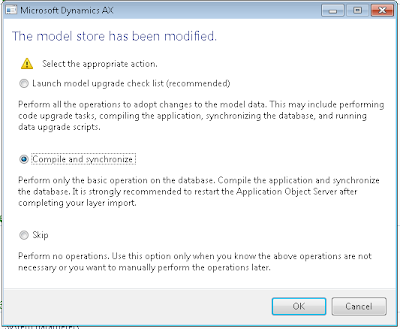
Choose the action appropriate for your situation.
8) Start the remaining AOSes.
In DAX 2012 adjustments for the meta data model and code are stored in the modelstore in the database.
In previous version deleting a layer containing adjustments to the standard application consisted of delete the ax
How is this done in DAX 2012 ?
The answer is a command-line tool called AxUtil.
To delete e.g. the usr-layer in the application do the following:
1) Shut down all AOS-servers but one (applicable only if you have more than one AOS running).
2) Go to command line interface on the server where the last AOS is running.
3) Go to the folder where DAX's management utilities are placed, e.g.
C:\Program Files\Microsoft Dynamics AX\60\ManagementUtilities
4) Run the Axutil like this:
Axutil delete /layer:
Axutil delete /layer:usr /db:MicrosoftDynamicsAx
Below an example is shown:

5) Restart the AOS
6) Start the DAX client.
7) In the process of starting up, DAX will detect that something has happened with the modelstore, and prompt you with:

Choose the action appropriate for your situation.
8) Start the remaining AOSes.
Hi Jacob,
ReplyDeleteIs it possible to use this method to delete customisations that were deployed via an .xpo? For instance we are now trying to remove "DynamicsConnectorR2.xpo" from the application.
The only recommended way has been to open the project that was deployed from the .xpo and delete the usr items one at a time.
Thoughts on any quicker methods?
Cheers!
Dillon
@dillon.bailey it is not possible to remove those XPO customization imports like that and opening the deployed project is most likely your best bet. Unless you managed to deploy it to the USR layer for example while all of your customizations may be in the CUS layer...but that is unlikely.
Deletehello, it is raising error "login failed for user ...".
ReplyDeleteAlthough I am running it through an admin account.